
✅ Press Win + N (Windows 11) to open Notification Center.
Then use Tab and Arrow Keys to navigate between alerts.
Mark as read, dismiss, or open apps — all hands-free!
Stay in control without touching your mouse.
#NotificationShortcuts #Windows11 #ShiftTips
You May Read This
-
✅ ShiftTips #057: Maximize or Restore Current Window
Control your window size instantly.
-
✅ ShiftTips #063: Take Screenshots Like a Pro
Capture your screen in seconds using built-in shortcuts on Windows or Mac. No third-party tools needed — fast, simple, and effective.
-
ShiftTips #005: Mute Unmute Mic in Zoom or Teams
Learn How to Mute Unmute Mic in Zoom or Teams Embarrassed by background noise during calls? Mute yourself instantly!✅ On […]
-
✅ ShiftTips #047: Mute Your System Audio Fast
Silence everything with one key.
-
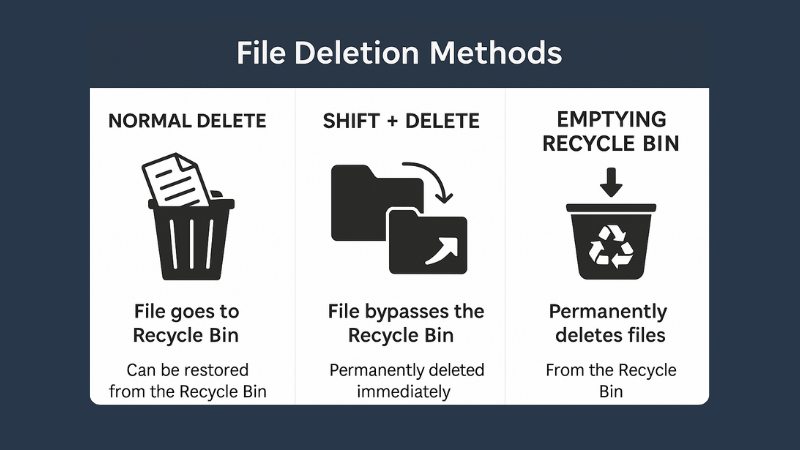
What is File Deletion: Know 3 Popular File Deletion Methods
What is File Deletion? We are going learn about what is file deletion in this article. File Deletion refers to […]
-
ShiftTips #027: Reopen Closed Files in VS Code
Ctrl + Shift + T is a browser shortcut that reopens the last closed tab, restoring its content and history for quick recovery of accidentally closed pages.
Popular Posts

10 Common Tech Beginner Mistakes: Everyone Should Know
Whether you’re a student, a working professional, or someone learning tech…

10 Pro Tricks on WhatsApp Text Formatting You Must Use
Whether you’re chatting with friends or sharing important messages in groups…

