

✅ Press Win + R to open the Run Dialog.
Type shortcuts like cmd, msconfig, or website URLs.
A must-use power-user tool for quick access to hidden features.
Try it now — launch like a pro!
#RunCommands #WindowsPowerTips #ShiftTips
You May Read This
-
ShiftTips #029: Open Emoji Panel on Mac
Ctrl + Cmd + Space on a Mac opens the Emoji Picker, letting you insert emojis into text across apps like Messages, Notes, and Chrome for expressive communication.
-
ShiftTips #013: Open File Explorer Fast
Win + E is a Windows keyboard shortcut that instantly opens File Explorer, providing quick access to files and folders for efficient navigation and management.
-
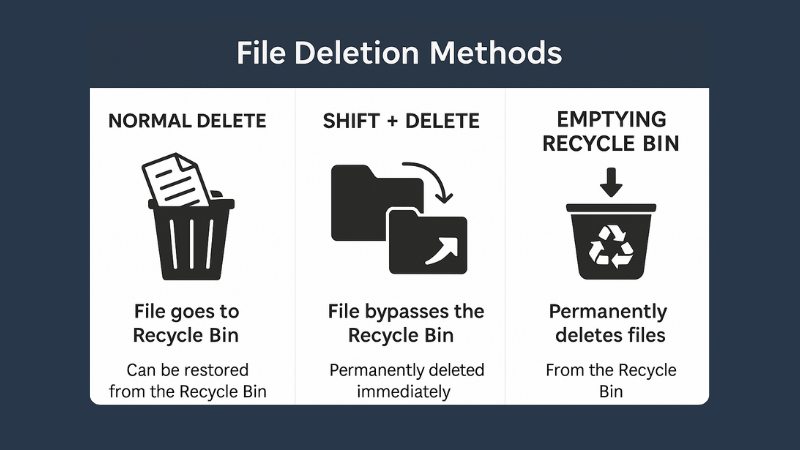
What is File Deletion: Know 3 Popular File Deletion Methods
What is File Deletion? We are going learn about what is file deletion in this article. File Deletion refers to […]
-
ShiftTips #031: Open Task View in Windows
Win + Tab opens Task View in Windows, displaying all open windows and virtual desktops for easy navigation and multitasking across applications.
-
10 Common Tech Beginner Mistakes: Everyone Should Know
In today’s digital age, everyone interacts with technology daily. Whether you’re a student, a working professional, or someone learning tech […]
-
✅ ShiftTips #041: Instantly Minimize All Other Windows
Focus on one window by minimizing all others with one shortcut.

Popular Posts

10 Common Tech Beginner Mistakes: Everyone Should Know
Whether you’re a student, a working professional, or someone learning tech…

10 Pro Tricks on WhatsApp Text Formatting You Must Use
Whether you’re chatting with friends or sharing important messages in groups…

