
Close Unresponsive Apps Immediately
App not responding? No need to restart your PC.
✅ Press Ctrl + Shift + Esc to open Task Manager
Find the frozen app > Right-click > Select End Task
This ends the app immediately without affecting others.
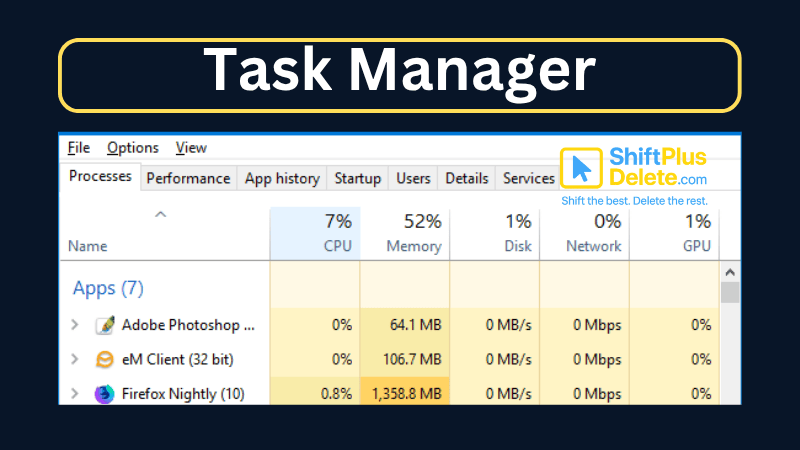
💡 Bonus: Task Manager shows RAM, CPU, and performance stats too.
It’s your go-to tool when something freezes.
Try it out next time something gets stuck!
📌 Why it matters: Helps fix freezes without needing to restart your PC.
#FixTips #WindowsShortcuts #ShiftTips
You May Read This:
-
✅ ShiftTips #063: Take Screenshots Like a Pro
Capture your screen in seconds using built-in shortcuts on Windows or Mac. No third-party tools needed — fast, simple, and effective.
-
✅ ShiftTips #051: Close the Current Window Quickly
Shut down any active window or tab without touching the mouse.
-
ShiftTips #039: Cycle Through Open Apps Backwards
Need to navigate your open apps in reverse? Simply press Alt + Shift + Tab to cycle through your app switcher backward. A handy shortcut for quick multitasking!
-
ShiftTips #017: Open Notification Center
The Win + A keyboard shortcut instantly opens the Action Center in Windows, displaying notifications, quick settings (Wi-Fi, Bluetooth, Dark Mode), and alerts for efficient system management.
-
ShiftTips #037: Open Clipboard Settings Quickly
Win + V opens the Windows clipboard history; clicking “Manage Clipboard Settings” lets you enable/disable history, clear data, or sync across devices for full control.
-
ShiftTips #007: Minimize All Windows Instantly
The Win + D keyboard shortcut in Microsoft Windows minimizes all open windows and applications to show the desktop.


Why Your Phone Is So Slow & How to Fix It in 5 Minutes
Is your phone lagging, freezing, or taking forever to load apps? A slow smartphone can be frustrating, but the good

How to Know If Your Password Was Leaked Online
Worried your password was leaked? In this article you will learn how to know if your password was leaked online.

